Web
Design
Web
Design Web Development
 Apps
Development
Apps
Development Digital
Marketing
Digital
Marketing CMS
CMS Ecommerce
 Emerging Tech


 By: Rushik Shah
Here’s the honest truth: generative AI isn’t some distant future thing anymore. It’s here. It’s working. And if you’re not using it, your competition probably is.
Generative AI is now core to how businesses get work done. It writes emails. It designs graphics. It builds code. It even edits videos. Tools exist for basically everything now.
But here’s the problem. There are so many tools out there. Which ones actually work? Which ones waste your time? Which ones fit your budget? That’s what we’re solving today.
We’ve picked the 10 tools that matter most. For each one, you’ll learn what it does, who should use it, what makes it good, and how much it costs. By the end, you’ll know exactly which tools fit your business.
What Is Generative AI? (Plain English Version)
Let’s start with a simple definition. Generative AI is software that creates new things from what you ask it to do.
You type a prompt. The AI understands what you want. Then it makes something new-text, images, code, video, or voice.
Think of it like having a smart assistant who can do many jobs. One moment it’s writing a marketing email. The next, it’s creating a logo. The next, it’s writing Python code for your developer team.
Different tools are good at different things. Some are faster. Some are more creative. Some focus on accuracy. That’s why you need to know which tool fits which job.
Why Generative AI Tools Matter to Your Business
Let me be direct. These tools save time. Lots of it.
A task that took your team 2 hours now takes 20 minutes. Your marketing person can write 5 ad copies instead of 1. Your developer can ship code faster. Your designer can mock up 10 concepts instead of 2.
Time saves money. When you work faster, you do more with fewer people. That’s how small businesses compete with big ones.
But speed isn’t the only win. These tools also help people do better work. Your customer support person isn’t a writer, but they can create helpful emails. Your salesperson isn’t a designer, but they can make decent graphics. Non-experts suddenly sound and look like pros.
And here’s another thing-generative AI handles the boring stuff. The repetitive work. The admin tasks. That frees your team to do real thinking, real creating, real problem-solving.
One more thing. Cost. Good tools often cost $20 to $100 per month. Compare that to hiring one person for one role. The math works out fast.
How We Picked These 10 Tools
You might wonder why these tools made the list and others didn’t. Good question.
We looked at what actually matters. How well does it work? Does it do what it promises? Is it easy to learn? Will it change how your business runs? Does it give you good value for the money?
We also talked to real people who use these tools. We read reviews. We tested them ourselves. We wanted tools that businesses actually trust and use every day.
The tools below have proven themselves. They’re not hype. They’re not experimental. They work, and thousands of businesses use them right now.
The Top 10 Generative AI Tools
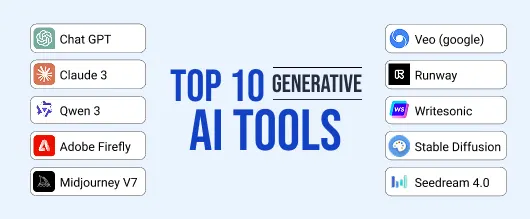
1. GPT-5 (OpenAI) – Best for Heavy Thinking & Advanced Reasoning
What it does: GPT-5 is the newest large language model from OpenAI. It’s designed to handle complex reasoning, writing, and coding tasks. This model is likely to be the central tool for text generation in 2026. It’s smarter than previous versions and faster too.
Best for: Developers working on complex coding. Business owners needing sophisticated analysis. Teams doing serious content work. Anyone who needs AI that really thinks through problems.
Key features:
- Advanced reasoning capabilities
- Writes code in multiple languages
- Handles complex analysis well
- Understands context across long documents
- Powers sophisticated chat workflows
Pros & Cons:
Pros: More intelligent than earlier versions. Handles nuance better. Great for coding. Learns from your feedback within conversations.
Cons: Requires paid subscription. Newer means fewer tutorials online yet. Can be overkill for simple tasks.
Real use case: A software development team uses GPT-5 to debug complex code issues. What used to take a senior developer 2 hours now takes 20 minutes. The AI traces through the logic, finds the bug, and explains the fix.
Pricing: Part of ChatGPT Plus at $20/month. Enterprise plans available.
2. Claude 3 (Anthropic) – Best for Long Documents & Safety-First Work
What it does: Claude 3 is built for safety and deep thinking. It reads massive documents without getting confused. It handles legal work, research, and sensitive topics. This AI was designed to be careful and accurate.
Best for: Lawyers reviewing contracts. Researchers analyzing data. Writers working on long-form content. Anyone handling sensitive information who needs accuracy.
Key features:
- Reads documents up to 100,000+ words
- Strong safety features built in
- Excellent at reasoning through complex problems
- Good at maintaining accuracy on long tasks
- Handles nuance and context really well
Pros & Cons:
Pros: Reliable and careful. Doesn’t guess on important stuff. Explains its thinking. Handles large documents better than most competitors.
Cons: Can be slower. Less creative than some other tools. Smaller user base means fewer online guides. Slightly higher price.
Real use case: A legal consultant uploads 50 pages of contracts to Claude 3. She asks it to find unusual terms or risks. Claude reads everything and highlights potential problems. What would take days happens in minutes.
Pricing: Free version available. Claude Pro is $20/month. Enterprise plans available.
3. Qwen 3 (Alibaba) – Best for Multimodal Work & All-in-One Solutions
What it does: Qwen 3 is a multimodal model from Alibaba. It handles text, images, and audio in one tool. It’s being updated aggressively with new features. Think of it as a do-everything AI.
Best for: Companies needing all-in-one AI. International teams (works well across languages). Developers building multimodal applications. Businesses wanting flexibility.
Key features:
- Supports text, images, and audio
- Updates regularly with new capabilities
- Works across multiple languages
- Good performance on reasoning tasks
- Growing ecosystem of integrations
Pros & Cons:
Pros: Does many things in one tool. Keeps improving fast. Good for global teams. Cost-effective for multimodal work.
Cons: Less well-known in North America. Smaller community for help. Privacy policies differ from Western tools.
Real use case: A marketing team uses Qwen 3 to analyze customer videos, extract text from images, and generate captions in multiple languages. One tool replaces what used to be three separate services.
Pricing: Free tier available. Pricing varies by usage. Generally competitive.
4. Adobe Firefly – Best for Designers & Business Branding Workflows
What it does: Firefly is Adobe’s generative AI. It lives inside design tools you might already use. It generates images, extends artwork, removes objects, and handles design tasks. Recently added video generation too.
Best for: Design teams. Companies doing business branding work. Anyone using Adobe Creative Suite. Marketers needing quick design edits. Teams wanting safe, commercial-use AI.
Key features:
- Generates images within design tools
- Removes or adds objects to photos
- Extends artwork beyond current boundaries
- Firefly Video Model for short videos
- Designed for commercial use (safe for business)
- Integrates with Photoshop, Illustrator, Express
Pros & Cons:
Pros: Safe for commercial use. Works inside tools you already use. Good for refinement work. Built by Adobe so quality is solid. Firefly Video Model is new and powerful.
Cons: Requires Adobe subscription. Less artistic than standalone image tools. Smaller community compared to others.
Real use case: A marketing team is designing a brochure. They have a product photo but need more space on the left side. Firefly extends the image. Instead of reshoot, 30 seconds and it’s done. They use Firefly Video Model to create a quick product demo video.
Pricing: Included in Adobe Creative Cloud subscriptions. Separate Firefly credits available.
5. Midjourney V7 – Best for Stylized & Artistic Image Generation
What it does: Midjourney V7 creates stunning, artistic images from text descriptions. The 2025 update adds more control and brand-style consistency. You describe what you want. It generates beautiful, creative artwork.
Best for: Designers wanting fast concepts. Marketing teams needing visual ideas. Artists exploring new styles. Anyone creating brand visuals. Companies wanting consistent brand aesthetics.
Key features:
- Creates highly creative, artistic images
- 4 variations for each request
- Upscales and refines images
- Many artistic styles to choose from
- Brand style consistency features
- Community gallery shows what’s possible
Pros & Cons:
Pros: Results are beautiful and creative. Intuitive once you learn basics. Community is large and helpful. Cost is reasonable. New V7 gives more control.
Cons: You need to learn prompt writing. Results aren’t always exactly what you imagined. Can’t edit as precisely as some tools. Requires Discord to use it.
Real use case: A small product company needs 12 social media graphics. Their designer would spend a week creating them. Instead, the team uses Midjourney V7 to generate 50 options with brand consistency. They pick the best 12 and do minor edits. Done in a day instead of a week.
Pricing: $10/month basic plan, $30/month standard, $60/month pro, $120/month unlimited.
6. Veo (Google / DeepMind) – Best for Text-to-Video Generation
What it does: Veo generates videos from text prompts. Recent versions (V3) create video plus audio from simple descriptions. It’s useful for marketers, content creators, and training videos. This is the future of fast video creation.
Best for: Marketing teams creating ads. Content creators making explainer videos. Companies needing training videos. Companies producing video on a budget. Anyone wanting AI-generated video with audio.
Key features:
- Generates videos from text prompts
- Creates audio alongside video
- Recent V3 version is more powerful
- Good for marketing and training content
- Realistic motion and scene quality
Pros & Cons:
Pros: Video generation is still rare. Faster than hiring videographers. Growing capabilities. Great for content creators.
Cons: Output can sometimes look artificial. Longer videos work less reliably than short ones. Still relatively new so fewer tutorials exist.
Real use case: A fitness coach wants 10 short workout instruction videos for Instagram. Hiring a videographer would cost thousands. Veo generates the videos with spoken instructions in a few hours for under $150. The coach reviews and posts.
Pricing: Free tier available. Premium plans available.
7. Runway Gen Models – Best for Creative Video & Motion Graphics
What it does: Runway is becoming powerful for creative video workflows. It handles generative video, motion graphics, and advanced video editing. It’s designed for creators who need flexible, powerful video tools.
Best for: Video editors. Motion graphics designers. Content creators. Marketing teams. Anyone doing serious video work.
Key features:
- Generative video creation
- Motion graphics tools
- Frame interpolation (smooths motion)
- Advanced video editing features
- Integrates with other creative tools
Pros & Cons:
Pros: Powerful for creative work. Growing capabilities constantly. Good community support. Flexible for different video needs.
Cons: Learning curve exists. Can be pricey with heavy use. Some features still experimental.
Real use case: A creative agency uses Runway to generate backgrounds for commercials. What used to require hiring special effects teams now happens in minutes. They can iterate on ideas much faster.
Pricing: Free basic tier. Standard plans at $12/month. Pro at $25/month. Enterprise pricing available.
8. Writesonic – Best for Marketing Content at Scale
What it does: Writesonic is a content engine built for marketers. It writes ads, social posts, landing page copy, email campaigns, and blog articles. Built specifically for teams who need lots of marketing content fast.
Best for: Marketing teams. Agencies creating content for clients. E-commerce stores needing product descriptions. Companies running multiple campaigns. Anyone scaling content production.
Key features:
- Templates for different content types
- Tone adjustment to match your brand
- Team collaboration built in
- SEO optimization features
- Brand voice training capability
Pros & Cons:
Pros: Made specifically for marketing. Team features included. Templates save tons of time. Can learn your brand voice.
Cons: Marketing-focused means less useful for other work. Output quality depends on your prompts. Can be expensive for small teams.
Real use case: An e-commerce store has 200 products needing descriptions. Writing manually takes weeks. Writesonic creates rough descriptions for all 200 in 2 hours. The team edits for brand voice. Done in days instead of weeks.
Pricing: Free trial available. Creator plan around $39/month. Business plan around $99/month. Enterprise pricing available.
9. Stable Diffusion (Various Versions) – Best for Open-Source & Customizable Image Generation
What it does: Stable Diffusion is open-source image generation software. It’s flexible, customizable, and can run on your own computers. Different versions and tools build on top of it. This is the AI for people who want control.
Best for: Developers wanting customizable AI. Teams with privacy concerns. Companies wanting to run AI locally. People who want to fine-tune models. Builders and engineers.
Key features:
- Open-source and customizable
- Can run locally on your hardware
- Many community versions available
- Strong performance in benchmarks
- Highly flexible for different use cases
Pros & Cons:
Pros: You own and control the model. Can customize for your needs. No privacy concerns with local deployment. Cost-effective at scale.
Cons: Requires technical knowledge. Setup is complex. Quality varies by version. Needs good hardware to run well.
Real use case: A tech company wants image generation that stays on their servers. They deploy Stable Diffusion locally. All image generation happens internally with no data leaving the company.
Pricing: Free (open-source). Some versions require payment.
10. Seedream 4.0 – Best for Photorealistic Image Generation
What it does: Seedream 4.0 is a newer image model from ByteDance. It’s gaining popularity fast. It excels at photorealism and performs well in recent model rankings. This is the model for realistic, professional-looking images.
Best for: E-commerce businesses needing product photos. Real estate companies. Companies needing realistic marketing images. Anyone requiring photorealism.
Key features:
- Excellent photorealistic quality
- Strong performance in benchmarks
- Fast generation speed
- Good detail accuracy
- Works well with product photography
Pros & Cons:
Pros: Exceptional photorealism. Newer model so keeps improving. Fast generation. Good for professional use.
Cons: Less well-known so fewer tutorials. Smaller community. Still relatively new.
Real use case: An online furniture store needs product photos for their catalog. Traditional photography would cost thousands. Seedream 4.0 generates professional-looking product images. They upload directly to their website.
Pricing: Free credits available. Pay-per-use model. Generally affordable.
Quick Comparison: See All Tools at a Glance
| Tool | Best For | Speed | Creativity | Ease | Starting Price |
| GPT-5 | Complex reasoning & coding | Medium | High | Medium | $20/mo |
| Claude 3 | Long documents & research | Medium | Medium | Easy | Free |
| Qwen 3 | Multimodal work | Medium | Medium | Medium | Free |
| Adobe Firefly | Design & branding | Fast | Medium | Hard | Adobe CC |
| Midjourney V7 | Artistic images | Medium | Very High | Medium | $10/mo |
| Veo | Video with audio | Slow | High | Medium | Free+ |
| Runway | Creative video & effects | Medium | High | Medium | Free + $12/mo |
| Writesonic | Marketing copy | Fast | Medium | Medium | $39/mo |
| Stable Diffusion | Local AI control | Fast | High | Hard | Free |
| Seedream 4.0 | Photorealistic images | Fast | Medium | Easy | Free + pay |
How These Tools Help Across Your Business
Marketing: Write ads. Create social posts. Design graphics. Edit videos. Generate product descriptions. What took days takes hours.
Sales: Draft personalized emails. Create proposals. Build sales scripts. Generate product comparisons. Your sales team sounds better and closes faster.
Operations: Automate documentation. Organize information. Write processes. Create checklists. Less busy work, more actual work.
HR: Write job descriptions. Create training materials. Draft emails. Organize policies. Building teams becomes less admin-heavy.
Product & Design: Generate concepts. Create prototypes. Edit visuals. Test ideas. Your design team innovates instead of just executing.
Support: Write response templates. Create help articles. Organize tickets. Draft chat responses. Your support team handles more issues in less time.
How to Choose the Right Tool for You
Here’s how to make the decision simple:
Step 1: What’s Your Main Task? Are you writing? Designing? Making videos? Editing? Different tools fit different jobs. Know what you need first.
Step 2: What’s Your Budget? Some tools are free. Some cost $10/month. Some cost $100/month. Know your budget first and stick to it.
Step 3: What’s Your Skill Level? Some tools are simple (Seedream, DALL-E). Others need learning (Midjourney, Stable Diffusion). Be honest about time to learn.
Step 4: What Tools Do You Already Use? If you use Google tools, Veo fits easy. Using Adobe? Firefly fits perfect. Using existing software? That matters for integration.
Step 5: What Kind of Output Do You Need? Text, images, video, audio, or code? Match the tool to the exact output you want.
Honest Talk: Things These Tools Can’t Do (Yet)
These tools are powerful. But they’re not perfect.
They can hallucinate. Sometimes they make up facts that sound true but aren’t. Always check important information. Don’t trust AI as your only source.
Privacy matters. What you upload goes to the company’s servers. For sensitive data, be careful. Some tools offer private options for a fee.
Prompts matter. Bad prompts get bad results. “Write me something good” doesn’t work. “Write a friendly email offering 20% off to past customers” works way better.
Brand voice takes work. AI can sound generic. You need to train it on your actual voice and edit output. One tool doesn’t match your brand voice automatically.
Quality needs polish. AI output is a starting point, not finished work. It needs human eyes and editing. Think of it as a first draft, not a final product.
What’s Happening Next in Generative AI
Keep your eye on these trends. They’re coming fast.
Multiple agents working together. Instead of one AI doing one task, several AIs will work as a team. Imagine a writing AI, a design AI, and an editing AI all collaborating on one project automatically.
Real-time generation. Tools will work with live data from your business. Your AI assistant will understand what’s happening right now. It won’t be looking at old information.
AI replacing specific software. Standalone tools will disappear. AI will become the core of every software you use. Your CRM will have AI. Your accounting tool will have AI. Everything will transform.
Autonomous workflows. You set rules once. Then AI runs the entire workflow without checking in. Upload 100 files, and AI processes all 100 based on your rules automatically.
AI copilots in every app. Every software will have an AI helper inside it. Nothing is standalone anymore. All tools become AI-powered.
Personalized AI just for you. AI will understand your exact way of working. It’ll learn your preferences, your tone, your goals. It’ll feel like a partner who really knows you.
Wrapping Up: Your Next Step
Generative AI tools are changing how work gets done. That’s not hype. That’s reality happening right now.
Each tool on this list does something specific well. GPT-5 for thinking. Midjourney V7 for images. Veo for video. The best businesses aren’t using one tool. They’re using several, each for what it does best.
Here’s what we recommend: Pick 2 or 3 tools from this list. Try them for a week or two. See which ones fit how you actually work. Then add them to your daily routine.
Start small. One tool. One workflow. See what changes. Then expand from there.
The businesses winning right now aren’t waiting for AI to be perfect. They’re using it today, learning as they go, improving every week. That can be you too.
Ready to Build AI Into Your Business?
Here’s the truth. Understanding these tools is one thing. Building AI into your actual workflows is another.
That’s where we come in.
At Alakmalak Technologies, we specialize in generative AI development services for small businesses. We don’t just tell you which tools to use. We build custom AI solutions that fit how you work.
We help with:
- Business branding that uses AI intelligently
- Custom AI workflows built into your systems
- Team training on AI tools
- Strategy to implement AI where it actually helps
- Integration with tools you already use
- Automation of repetitive tasks
- Building AI copilots for your business
We work with business owners and developers just like you. We understand the real challenges. We build real solutions.
You don’t need to figure this out alone. Let’s talk about how AI can transform your specific business. The right tools and strategy can save you thousands of dollars and hundreds of hours every month.
Ready to get started? Reach out to Alakmalak Technologies today. Let’s discuss your biggest challenges and build an AI strategy that actually works.
Contact us for a free consultation on generative AI development services for your business. Let’s talk about your goals and create a custom plan to automate what matters.